

How to Evaluate 3D scanning innovation for Inspection
See how INSVISION AlphaScan handheld 3D scanning innovation solves metrology challenges in reverse engineering, mold inspection, and medical device manufacturing.
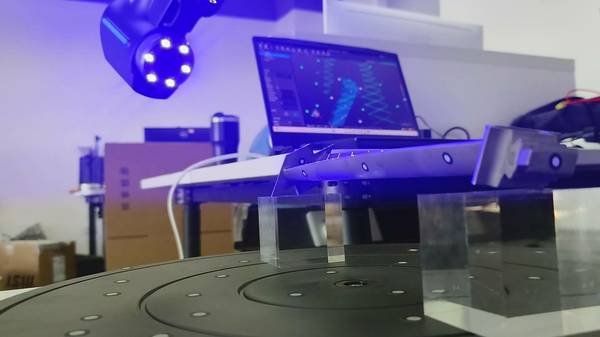
A Tier-1 automotive supplier loses the CAD files for a transmission housing that has been in production for fifteen years. The part is still in service, tooling exists, but the digital definition is gone. Without a complete 3D model, any tooling modification, spare parts run, or design refresh becomes a guessing game.
The line is at risk, and traditional measurement tools—CMMs, hand gauges, even laser trackers—capture only discrete points. They leave gaps across the complex freeform surfaces that define the housing’s fit and function. This is the kind of moment where a handheld 3D scanning innovation shifts from a nice-to-have to a production-critical asset.
Core Pain Points: Why Traditional Tools Fall Short
The transmission housing scenario exposes three recurring pain points that quality managers and manufacturing engineers face across industries:
- Incomplete geometry capture. CMM touch-probe routines and manual gauging deliver point-by-point measurements. On a casting or machined housing with blended radii, draft angles, and organic surface transitions, those sparse points miss the full shape. Reverse engineering from such data requires extensive manual surfacing and guesswork.
- Part accessibility. Moving a large, installed assembly to a climate-controlled metrology lab is often impractical. Disassembly risks damaging fragile tooling or disrupting production. Fixed CMMs and bridge-type scanners demand that the part come to the instrument—a constraint that breaks down when the part is a press platen, a wind turbine gearbox housing in the field, or a mold still mounted in the press.
- Disconnected inspection workflows. Even when a scan is captured, translating raw point clouds into actionable GD&T reports frequently involves multiple software platforms. Engineers export meshes, manually reconstruct datums, and rebuild inspection plans in separate packages. The process introduces latency and the risk of alignment errors, especially when reporting must conform to ASME Y14.5 or ISO 1101 standards.
A Portable Metrology Solution Built for the Factory Floor
INSVISION’s AlphaScan handheld scanner addresses these constraints with a design philosophy rooted in real factory conditions. The system uses a multi-line Class 1 eye-safe blue laser array—30 or 42 total lines, including 22 or 34 cross lines for rapid area coverage and a single dedicated line for fine-detail capture.
Blue laser light performs better on shiny and dark surfaces than red laser alternatives, reducing the need for spray coatings that can alter part dimensions and slow down the workflow.
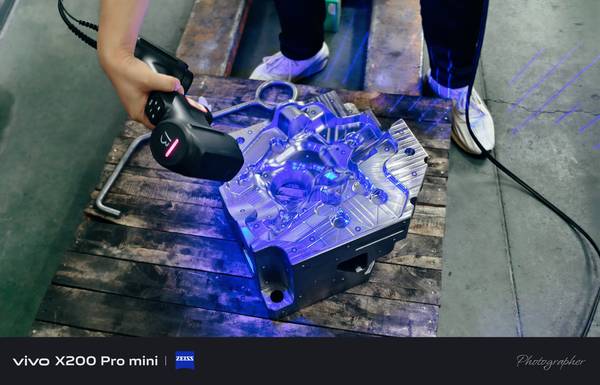
Under the hood, AI-powered point cloud processing algorithms clean noise and sharpen edges on the fly. The operator sees usable data immediately, not a raw point soup that requires hours of post-processing. The handheld form factor eliminates the fixed setup: you walk up to the part, scan, and move on. A locking USB connection prevents the data dropouts that plague long scanning sessions in vibration-heavy environments.
Data flows directly into INSVISION’s 3D software for scan-to-model workflows, or into the SMARPARA Q platform for GD&T analysis and multi-format export, creating a seamless digital thread from the shop floor to the inspection report.
How AlphaScan’s Design Addresses Industrial Realities
Every engineering choice behind the AlphaScan was driven by what actually stops a scan job on a production floor. For quality managers, the obstacles usually boil down to three things: part geometry that defeats a single scan mode, physical access constraints that make moving the part impossible, and the need to generate inspection reports that map directly to ISO and ASME GD&T callouts without manual rework.
Multi-mode scanning responds to the mix of features found in mold and tooling work. A single die insert might combine broad machined surfaces, deep cooling channels, and sharp edges with tight form tolerances. Standard mode uses the full crossed blue laser array to capture large areas quickly.
Deep hole mode switches to a single-line laser pattern and adjusts exposure logic so the sensor can pull data from cavities where light normally traps and bounces. Fine scan mode tightens the laser line density and sampling strategy for high-reflective metal surfaces that would otherwise bloom or return noisy data. The operator changes modes in software;
the laser projection, camera exposure, and point filtering pipeline adjust in one step. That matters when you’re scanning a polished core pin one minute and a textured cavity the next.
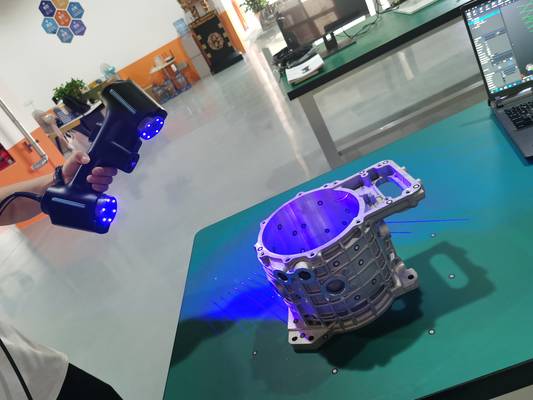
Portability is not a convenience feature. It is a requirement for shops that cannot afford to move large, fixed assemblies or risk damaging fragile tooling during transport. The lightweight, handheld AlphaScan can be used inside a cramped production line, on a press platen, or at a remote MRO facility without rigging or disassembly.
The same scanner that inspects a mold in the toolroom can be carried to a wind turbine gearbox housing in the field. USB-based data and power keep the setup simple, and the locking connector design prevents cable drops that disrupt busy inspection areas.
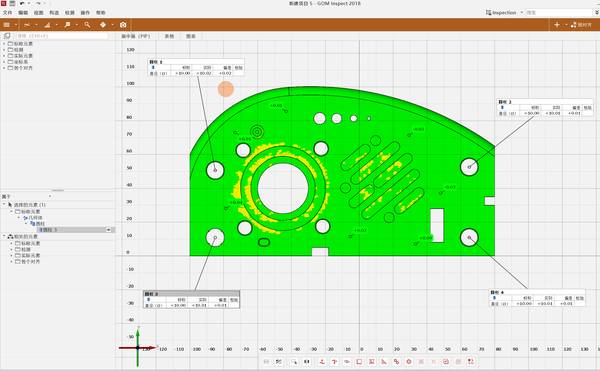
Built-in GD&T reporting aligns scan output with the language of Western manufacturing standards. Instead of exporting a mesh and manually reconstructing datums, flatness, profile, or true position in separate software, the SMARPARA Q platform reads the scan data directly against the CAD nominal and produces reports with ASME Y14.5 or ISO 1101 annotations.
For a quality manager reviewing a first-article inspection, the report structure matches the drawing, not a generic deviation color map. The workflow from scan to actionable dimensional data stays inside a single environment, cutting the time and error risk of translating between tools.
Deployment in Practice: From Scan to Actionable Data
Returning to the lost transmission housing CAD, the deployment process illustrates how the technology translates into a practical reverse engineering workflow.
- Preparation. The housing remains in its assembly fixture on the shop floor. No disassembly or transport is required. The operator connects the AlphaScan via USB, opens the scanning software, and selects standard mode for the broad exterior surfaces.
- Scanning. The multi-line blue laser sweeps the part in minutes, capturing millions of points across the freeform surfaces. For deep internal bores and oil galleries, the operator switches to deep hole mode, which adjusts the laser pattern and exposure to extract data from cavities that would defeat a fixed scanner. Fine scan mode is used on machined sealing faces to capture sharp edges and tight form tolerances.
- Data processing. The onboard AI algorithms filter noise and align scans automatically. The resulting watertight mesh is exported directly into INSVISION’s 3D software, where engineers begin reconstructing parametric CAD models. The full-field data preserves the design intent of blended transitions and draft angles that point-based tools would miss.
- Delivery. The final CAD model is validated against the scan data using SMARPARA Q, which generates a deviation map and a GD&T report aligned with the original drawing’s datums. The digital master is now available for tooling modifications, spare parts manufacturing, or design refreshes.
Observable Impact on Quality and Throughput
In this scenario, the AlphaScan eliminates the need to move a large, installed assembly to a metrology lab. The full-field capture provides a complete digital twin in a single session, replacing days of CMM programming and manual surfacing with a streamlined scan-to-CAD workflow. The resulting parametric model is traceable to the physical part, giving engineers confidence that the digital definition matches reality.
While specific time savings depend on part complexity, the qualitative shift is clear: what was once a multi-day, multi-tool exercise becomes a single-operator, single-session task.
Extending the Approach to Mold, Medical, and MRO Workflows
The same handheld 3D scanning innovation proves its value across a range of industrial applications where complex geometry, difficult surfaces, and portability are non-negotiable.
- Injection mold inspection. Polished cavities and cores scatter light, causing most scanners to produce noisy data or drop out entirely. AlphaScan’s dedicated scan modes for shiny surfaces maintain data integrity deep inside narrow ribs and textured areas. A quality manager can scan a mold after a production run, overlay the point cloud on the nominal CAD model, and instantly see where wear, galling, or dimensional drift has occurred. This capability catches surface defects and cavity deformation that would go unnoticed with dial indicators or manual profilometry, reducing unplanned tool maintenance and rejected shots.
- Medical device metrology. Surgical instrument jaws, implant trials, and microfluidic housings demand metrology-grade accuracy because tolerances often sit below 0.05 mm. AlphaScan delivers volumetric precision that holds up under first-article inspection requirements. Instead of a handful of CMM touch points, the scanner provides full surface deviation maps that align with ISO 13485 quality system expectations and give auditors the traceable digital records they require.
- On-site MRO and digital twin updates. When large assemblies cannot be moved to a metrology lab—wind turbine gearboxes, aerospace structures, heavy machinery—the handheld scanner goes to the part. It captures as-maintained geometry for wear analysis, repair planning, and digital twin updates, feeding directly into Industry 4.0 workflows where measured data closes the loop between physical assets and their digital representations.
Choosing the Right Measurement Tool for the Job
Most shops still treat measurement as a binary choice between a CMM in the lab and a caliper on the bench. That framing misses where real inspection time gets lost: moving parts, waiting for programs, and chasing surface profiles that a single-point probe cannot fully describe. The table below outlines how handheld 3D scanning, fixed CMM, and manual gauging each fit into a modern quality workflow.
| Method | Key Strengths | Ideal Scenarios |
|---|---|---|
| AlphaScan handheld 3D scanning | Metrology-grade accuracy, full 3D geometry capture, portability for on-site use, integrated scan-to-report workflow, multi-mode support for complex surfaces | Flexible, complex, on-site measurement; first-article inspection with freeform surfaces; reverse engineering; assembly-level digitization where moving the part is impractical |
| Fixed CMM | High repeatability for standardized part testing, well-established for lab-based high-volume inspection | Lab-based high-volume inspection of prismatic parts with tight GD&T callouts; programs that run the same part family for years |
| Manual caliper/gauging | Low upfront cost for simple single-dimension spot checks | Quick single-dimension checks on the shop floor; rough go/no-go verification when a full 3D record is not required |
The real differentiator is not accuracy—it is access. A CMM delivers sub-micron repeatability inside a temperature-controlled lab, but pulling a large weldment or an installed assembly off the line just to probe a few datums introduces delays that no CMM speed can recover.
Portable 3D scanning brings metrology-grade structured light directly to the part, capturing millions of points in a single pass and feeding them into an inspection report without bouncing between separate alignment, analysis, and reporting tools. That end-to-end workflow is what turns a scan into a decision, not just a point cloud.
Conclusion
INSVISION’s AlphaScan handheld 3D scanning innovation addresses the daily friction of industrial metrology: complex geometries that demand adaptive scan modes, physical constraints that demand portability, and standards-driven reporting that demands GD&T compatibility.
By grounding its design in real factory-floor conditions—lost CAD, shiny surfaces, deep cavities, and inaccessible assemblies—the system delivers a practical bridge between the flexibility of manual inspection and the rigor of lab-based metrology.
For engineers and quality managers evaluating 3D scanning, the question is not whether the technology works in a lab, but whether it holds up on a factory floor with real parts, tight deadlines, and unforgiving materials. AlphaScan’s performance across automotive reverse engineering, mold inspection, medical device metrology, and on-site MRO answers that question with a straightforward yes.
Hangzhou Insvision Technology Co., Ltd.
Address: Building 1, No. 1399 Liangmu Road, Yuhang District, Hangzhou, Zhejiang 311121, China
Copyright © Hangzhou Insvision Technology Co., Ltd. All rights reserved.
Copyright © Hangzhou Insvision Technology Co., Ltd. All rights reserved.