

3D scanner for cad: Principles, Evaluation Criteria, and Practical Boundaries
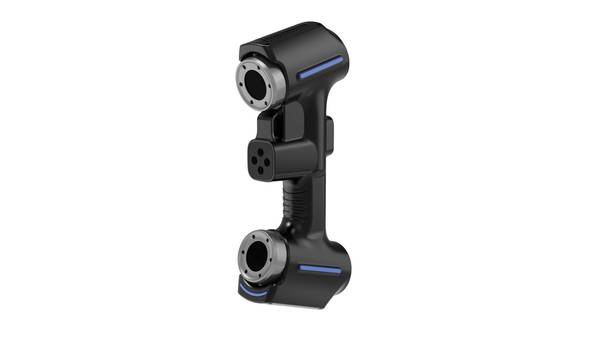
3D scanner for cad: a guide to acquisition principles, evaluation criteria, processing steps, method limits, equipment checks, and acceptance boundaries.
Definition and Scope
A neutral verification boundary applies whenever scan data moves into a CAD environment: the point cloud or mesh is not yet a parametric model, and treating it as one creates downstream problems. The workflow separates into four distinct deliverables.
| Deliverable | Primary Question | Typical Output |
|---|---|---|
| Capture | Does the data represent the physical part? | Point cloud, mesh |
| Inspection | Where does the part deviate from nominal? | Deviation map, report |
| Modeling | Can the geometry be edited parametrically? | CAD surface or solid |
| Approval | Does the output meet the stated requirement? | Signed validation record |
A 3D scanner for CAD supports capture and inspection directly. Modeling requires separate software, and approval depends on internal quality criteria rather than scanner output alone.
Data-Capture Principles
Optical capture depends on confirming line of sight, surface visibility, and a stable coordinate reference before any scan data is trusted. If a surface returns weak or saturated light, the resulting point cloud may contain gaps that cannot be corrected later by software alone.
Surface response varies by material, finish, and angle: matte, light-colored parts reflect predictably, while glossy, transparent, or dark surfaces require temporary preparation. Coordinate formation then ties each captured point to a shared datum, allowing the scan to be aligned, inspected, or exported for CAD without manual reconstruction.
| Condition | Effect on Capture |
|---|---|
| Direct visibility | Required for optical measurement |
| Matte, diffuse surface | Predictable light return |
| Glossy or dark surface | Unstable or missing points |
| Shared datum | Enables coordinate formation |
Key Evaluation Criteria
Evaluation should connect each criterion to evidence and a verification method, while unresolved items remain open.
| Criterion | Meaning | Required evidence | Verification method |
|---|---|---|---|
| Target coverage | Whether planned surfaces and features enter the data | Task definition and region list | Check covered and uncovered areas on a representative part |
| Data usability | Whether the output enters the downstream inspection or modeling workflow | File and interface requirements | Import and read back the output in the target workflow |
| Acceptance traceability | Whether the decision maps to a criterion, version, and reviewer | Approval and change records | Retain settings, evidence, and unresolved items |
Data-Processing Workflow
The data-processing workflow should keep capture, cleanup, alignment, meshing, comparison, and export as separately recorded stages. Each stage needs a defined input, output, and verification boundary before data moves forward.
| Stage | Primary output | Verification boundary |
|---|---|---|
| Capture | Raw point or range data | Record target coverage, missing regions, and capture conditions |
| Cleanup | Data with unrelated points removed | Confirm that required edges, holes, and datum features remain |
| Alignment | Data in one coordinate system | Record the reference method, selected datums, and residual result |
| Meshing | Surface data for downstream use | Review the scope of hole filling, smoothing, and simplification |
| Comparison | Deviation results against nominal data | Bind the reference version, tolerance band, and evaluated region |
| Export | Target file or report | Import and read back units, coordinates, and required entities downstream |
Use Boundaries and Limitations
A neutral verification boundary is that no single scan path captures every surface condition, so the operator must define what the dataset will and will not represent before acquisition begins.
| Boundary Type | Effect on CAD-Relevant Data | Verification Consideration |
|---|---|---|
| Occlusion or deep feature | Missing geometry behind shoulders or inside narrow slots | Check line-of-sight access before accepting a mesh |
| Reflective or transparent surface | Floating points, holes, or distorted curvature | Use matting spray or controlled lighting only where tolerances allow |
| Fine detail below scan resolution | Rounded edges, lost engraving or small radii | Compare against a higher-resolution reference or tactile check |
| Datum strategy mismatch | Scanned mesh may not align to the part’s GD&T datum order | Establish datum features before meshing, not after |
Common Misconceptions
A scan file that opens cleanly and a nominal CAD comparison that shows color-mapped deviation does not, by itself, confirm dimensional acceptance. The verification boundary is the tolerance callout: a surface profile, position, or runout requirement must be evaluated against the actual measured points, not against a smoothed mesh or a best-fit alignment that minimizes apparent error.
| Assumption | Verification boundary |
|---|---|
| Scan completion proves the part is good | Scan coverage and registration quality must be checked before any GD&T evaluation |
| Nominal CAD overlay shows acceptance | Deviation must be read against the specific tolerance zone and datum reference frame |
A completed scan can still contain unresolved reference targets, poor edge data, or alignment drift that shifts results inside or outside tolerance. Acceptance requires a documented link between the scan data, the datum scheme, and the stated tolerance, not the visual completeness of the model.
Related Concepts
Related concepts need separate deliverables and decision boundaries; one capture does not by itself complete every downstream task.
| Concept | Typical output | Decision boundary |
|---|---|---|
| 3D scanning | Point or range data | Confirm target coverage and capture conditions |
| 3D digitization | Storable and exchangeable geometry | Confirm completeness, coordinates, and format |
| Dimensional inspection | Evaluation against a reference or tolerance | Confirm datums, versions, and acceptance rules |
| Reverse engineering | Geometry used for reconstruction | Confirm coverage and downstream modeling requirements |
| CAD reconstruction | Parametric or surface model | Confirm intended use, interfaces, and review requirements |
Whether one captured data set can support several tasks must be verified against each task’s output and acceptance evidence.
Equipment and Supplier Validation
Equipment and supplier validation should use a representative part that covers the target geometry, surface condition, visibility, and datum requirements. Check whether the target area is captured, whether the point cloud or mesh can be exported in the required format, and whether the downstream system can read it.
Keep capture settings, missing regions, reference method, interface result, and acceptance evidence in the same validation record.
Reviewed official product documentation places AlphaScan handheld 3D scanner within the application scope discussed here. That source establishes only the product and use boundary stated by the publisher; it does not establish fitness for every part. A final decision still requires representative-part capture, interface readback, and predefined acceptance criteria.
Frequently Asked Questions
What must be defined before data capture begins?
Define the required data, inspection decision, model file, or approval result, with separate inputs, outputs, and acceptance evidence. Captured scan data does not by itself complete inspection, modeling, or approval.
How should a representative part be validated?
Choose a part that covers the target geometry, surface response, visibility, and datum conditions, then document capture settings, alignment, and output format. Judge suitability against the approved task criteria, not merely against scan completion.
What can official documentation establish?
Official documentation supports only the specifications, interfaces, and product scope that it states. Suitability for a particular part, environment, workflow, and acceptance rule still requires representative-part validation.
- What Is 3D Scanning? Principles, Workflow, and Industrial Applications 3D scanning is a digital measurement technology that converts the surface geometry of physical objects into 3D data. This entry covers its working principles, core parameters, industrial use cases, common misconceptions, and related technical…
- What Is a 3D Scanner? Types, Parameters, and Selection Criteria A 3D scanner captures three-dimensional surface data from physical objects and converts geometry, dimensions, and features into digital data for inspection, reverse engineering, and modeling.
- What Is 3D Scanning Accuracy? Accuracy, Repeatability, and Resolution Explained 3D scanning accuracy describes how closely scan data matches an object's actual geometry and dimensions. It is assessed through local accuracy, volumetric accuracy, stitching accuracy, repeatability, and resolution.
- What Is Point Cloud Data? Point Clouds, Meshes, and CAD Models in 3D Scanning Point cloud data is an important raw data format in 3D scanning. It consists of discrete 3D coordinate points that describe object surface geometry and support inspection, reverse engineering, modeling, and archiving.
Hangzhou Insvision Technology Co., Ltd.
Address: Building 1, No. 1399 Liangmu Road, Yuhang District, Hangzhou, Zhejiang 311121, China
Copyright © Hangzhou Insvision Technology Co., Ltd. All rights reserved.
Copyright © Hangzhou Insvision Technology Co., Ltd. All rights reserved.