

3D Scan Texture Mapping: Definition, Principles, and Key Application Criteria
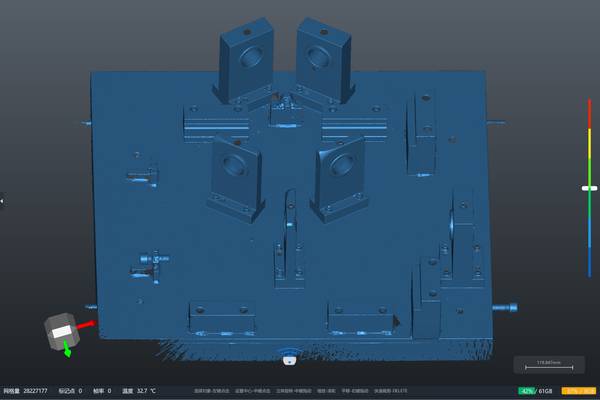
3D scan texture mapping ties the geometric shape of a scanned object to its visible surface appearance, producing a digital twin that carries both 3D form and r
What Is 3D Scan Texture Mapping
In industrial 3D scanning, texture mapping is the process of projecting two-dimensional color or reflectance data onto a three-dimensional mesh or point cloud. The result is a textured 3D model whose surface shows the actual visual appearance of the scanned object—paint, labels, stains, grain, print, or damage marks—accurately registered to the geometry.
Common Questions
What should teams check when evaluating What Is 3D Scan Texture Mapping?
In industrial 3D scanning, texture mapping is the process of projecting two-dimensional color or reflectance data onto a three-dimensional mesh or point cloud.
What should teams check when evaluating How Texture Mapping Works in a 3D Scanning Pipeline?
A typical texture mapping workflow follows four steps, though the order can vary by scanner type:
What should teams check when evaluating Key Parameters and Selection Criteria?
When evaluating texture mapping capability, industrial buyers and technical users look at a set of measurable attributes.
Unlike synthetic texture generation, which artificially applies repeating patterns, 3D scan texture mapping captures real-world surface detail. The technique is used heavily in reverse engineering, cultural heritage digitization, visual effects, quality documentation, and anywhere that “what it looks like” matters alongside “what shape it is.”
How Texture Mapping Works in a 3D Scanning Pipeline
A typical texture mapping workflow follows four steps, though the order can vary by scanner type:
- Geometry capture – The scanner acquires the 3D shape as a point cloud or mesh, usually through structured light, laser triangulation, or photogrammetry.
- Color or texture capture – Built-in or external cameras record the surface color. Some scanners capture per-vertex color during scanning; others capture high-resolution images separately and map them later.
- Registration and alignment – The 2D images are aligned to the 3D geometry using the scanner’s known calibration between the depth sensor and the color sensor (intrinsic/extrinsic parameters).
- UV unwrapping and texture baking – A UV map is generated for the mesh. The aligned images are then projected and blended into a texture map, often stored as a diffuse/albedo map in standard formats such as PNG, JPEG, or TIFF.
Handheld scanners like the structured-light systems often perform the alignment automatically, relying on feature tracking or marker arrays. The quality of the final texture map depends heavily on the consistency of lighting, the resolution of the color sensor, and the accuracy of the texture-to-geometry alignment.
Key Parameters and Selection Criteria
When evaluating texture mapping capability, industrial buyers and technical users look at a set of measurable attributes. The table below summarizes the main parameters without attaching specific instrument models.
| Parameter | What It Describes | Why It Matters for Texture Mapping |
|---|---|---|
| Color sensor resolution | Native pixel count of the RGB camera(s) | Determines maximum texture detail; 5 MP and above is common for detailed visual documentation |
| Texture resolution (texel density) | Pixels per millimeter on the 3D surface | Drives the crispness of labels, text, and edge definition in the final texture |
| Color fidelity | White balance accuracy, delta-E, bit depth | Affects whether the digital twin can be used for color-critical tasks such as branding or conservation |
| Geometry-to-texture alignment error | Deviation between the 3D edge and the mapped texture edge | A misalignment of even one pixel can make text illegible or surface features appear to float |
| Lighting control | Built-in flash/LED vs. ambient light reliance | Consistent, controlled illumination reduces shadows and color seams across scans |
| Output texture formats | PNG, JPEG, TIFF, EXR, and whether multi-layer (e.g., roughness, metallic) | Determines compatibility with downstream software (CAD, rendering, game engines, inspection tools) |
| Texture mapping workflow | Real-time per-vertex coloring vs. post-process UV unwrapping | Real-time gives immediate feedback; post-process produces higher-quality, seamless textures |
No single parameter alone defines “good” texture mapping. The combination of resolution, alignment accuracy, and lighting consistency usually determines whether a textured model is good enough for the intended use.
Where texture mapping adds clear value:
- Cultural heritage and conservation – Documenting artifacts, sculptures, and archaeological finds with true-color surface appearance for archival and research.
- Visual effects and game asset creation – Producing photorealistic props, characters, and environments from real-world scans.
- Quality control and defect documentation – Recording surface blemishes, corrosion, dents, or graffiti with their exact location on the 3D shape.
- Product design and packaging mockups – Placing label and branding graphics onto scanned packaging or product shells for review.
- Medical and dental records – Capturing true-color facial scans or dental arches where color is part of the clinical record.
Where texture mapping is often unnecessary or misleading:
- Pure dimensional inspection – When the only deliverable is a GD&T report or a CAD comparison, color data adds file size and processing time without improving measurement accuracy.
- High-speed in-line inspection – Texture capture requires stable lighting and extra processing; cycle time constraints often make it impractical.
- Objects with uniform, featureless surfaces – If the surface is already a single solid color, texture mapping adds little information beyond what the geometry provides.
- Scenarios where lighting cannot be controlled – Outdoor scanning under strong sunlight or deep shadows tends to produce inconsistent color and seams.
Misconception 1: “Texture mapping makes the scan more accurate.”
Texture mapping improves visual realism, not geometric accuracy. A textured model can look perfect while still carrying millimeter-level shape errors.
Misconception 2: “Higher camera resolution always means better textures.”
Sensor resolution is only one part. Poor alignment, inconsistent lighting, or low bit depth can negate the advantage of a high-resolution sensor.
Misconception 3: “Texture mapping is just a color overlay.”
It is a calibrated projection. If the projection is not based on the actual sensor geometry, surface curvature, and occlusion, the texture will appear warped or incorrectly positioned.
Misconception 4: “Any 3D scanner can produce production-ready textures.”
Many industrial scanners capture only geometry. Adding texture mapping requires a dedicated color sensor, calibrated optical path, and proper software pipeline, and not all systems offer it.
Related Concepts
| Concept | How It Differs from 3D Scan Texture Mapping |
|---|---|
| Vertex coloring | Color is stored per vertex of the mesh; lower resolution than UV-mapped textures and limited by mesh density. |
| Photogrammetry | Reconstructs both shape and color from photographs alone; texture is inherent to the method but geometry can be less accurate than active scanning. |
| Material capture (PBR scanning) | Goes beyond diffuse color to capture reflectance properties (roughness, metallic, normal) for physically based rendering. |
| UV mapping | The mathematical process of flattening a 3D surface into a 2D coordinate space; a necessary step for texture mapping, but not the mapping itself. |
| False-color inspection mapping | Uses color to represent deviation values, not real surface appearance; a different purpose entirely. |
Relationship to INSVISION Products and Solutions
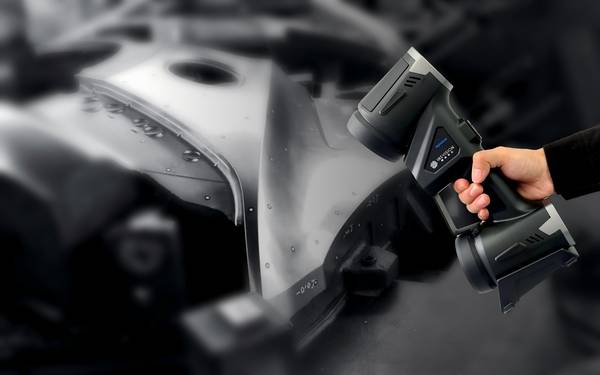
INSVISION, an AI-driven metrology-grade 3D vision technology provider, incorporates texture mapping into its AlphaScan handheld 3D scanner series. The AlphaScan system captures geometry and full-color surface textures in a single scan session, using calibrated onboard RGB cameras and controlled illumination to minimize alignment errors and color inconsistency.
The resulting textured meshes can be exported in standard formats compatible with common reverse engineering, rendering, and inspection software.
The texture mapping capability of AlphaScan is designed for applications where surface appearance matters alongside dimensional accuracy—cultural heritage documentation, visual effects, product design review, and quality documentation. The system uses a capture-to-texture pipeline that avoids the need for separate photogrammetry equipment in many cases, which can simplify fieldwork and reduce post-processing time.
FAQ
Can texture mapping be done with a laser scanner?
Typically, no. Most laser scanners measure only intensity (reflectance) and do not capture color. Some hybrid systems combine a laser scanner with a separate color camera, but full-color texture mapping is more common on structured-light or photogrammetry systems.
Does texture mapping increase the file size significantly?
Yes. A high-resolution texture map can be larger than the geometry file itself. For applications that do not need color, it is better to export geometry-only formats.
How do I know if the texture alignment is accurate enough?
Look at sharp edges and small text on the scanned object. If the texture visibly shifts or blurs across the edge, the alignment error is too high for documentation that requires precise color-to-shape registration.
Is post-processing always required for texture mapping?
In most cases, yes. Even scanners that capture real-time color may need UV unwrapping, seam blending, or color correction in software to produce a seamless final texture map.
Summary
3D scan texture mapping bridges the gap between a purely geometric 3D model and a complete digital twin that carries real-world visual information. It is a capture-and-projection process that depends on calibrated optics, consistent lighting, and accurate alignment.
While not a substitute for dimensional accuracy, texture mapping is essential when the goal is to record, communicate, or recreate the actual appearance of a physical object. INSVISION’s AlphaScan handheld scanner offers one approach to integrated geometry-and-texture capture, serving application areas where both form and surface detail matter.
- What Is 3D Scanning? Principles, Workflow, and Industrial Applications 3D scanning is a digital measurement technology that converts the surface geometry of physical objects into 3D data. This entry covers its working principles, core parameters, industrial use cases, common misconceptions, and related technical…
- What Is a 3D Scanner? Types, Parameters, and Selection Criteria A 3D scanner captures three-dimensional surface data from physical objects and converts geometry, dimensions, and features into digital data for inspection, reverse engineering, and modeling.
- What Is 3D Scanning Accuracy? Accuracy, Repeatability, and Resolution Explained 3D scanning accuracy describes how closely scan data matches an object's actual geometry and dimensions. It is assessed through local accuracy, volumetric accuracy, stitching accuracy, repeatability, and resolution.
- What Is Point Cloud Data? Point Clouds, Meshes, and CAD Models in 3D Scanning Point cloud data is an important raw data format in 3D scanning. It consists of discrete 3D coordinate points that describe object surface geometry and support inspection, reverse engineering, modeling, and archiving.
Hangzhou Insvision Technology Co., Ltd.
Address: Building 1, No. 1399 Liangmu Road, Yuhang District, Hangzhou, Zhejiang 311121, China
Copyright © Hangzhou Insvision Technology Co., Ltd. All rights reserved.
Copyright © Hangzhou Insvision Technology Co., Ltd. All rights reserved.