

Integrating 3D Scanners for CAD
Discover how to integrate 3D scanners for CAD workflows on the production line. Learn about metrology-grade scanning, AI-powered capture, and workflow
The challenge is bridging the gap between a vibrating assembly bay and the controlled environment of a CAD station—without compromising data integrity.
This guide examines the critical integration factors, from intelligent data capture to workflow compatibility, for Western manufacturing teams implementing inline digital inspection.
Why Scanner Intelligence Matters More Than Raw Resolution
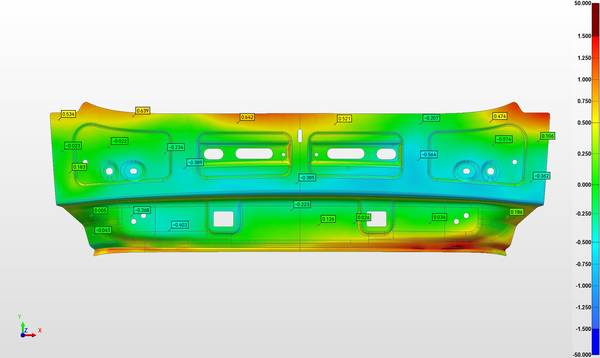
Capturing a part’s surface is straightforward; reconstructing its complete, metrology-grade geometry for CAD comparison is not. Traditional methods struggle with occluded surfaces, deep cavities, and tight radii, leaving critical gaps in the data. Effective 3D scanners for CAD must intelligently resolve these blind spots.
Key Points at a Glance
- Capturing a part’s surface is straightforward;
- A scanner’s laboratory specification sheet often promises more than it can deliver next to a running CNC mill or in an MRO bay.
- The highest return on investment comes from deploying CAD-driven scanning where the engineering challenge is greatest.
- Technical specifications provide a framework, but confidence comes from seeing the system handle your specific parts and workflows.
The INSVISION AlphaScan series addresses this by pairing 50 intersecting blue laser lines with AI super-resolution algorithms.
This combination reconstructs hidden features—such as internal wear on a returned turbine blade or the deep recesses of an injection mold—that contact probes might miss. A dual-axis galvanometer projects the CAD model’s contours directly onto the workpiece, visually guiding the operator to critical inspection zones.
For large assemblies like aerospace subframes, photogrammetry scale bars establish a stable global coordinate system, preventing cumulative error.
The output is an inspection-ready dataset processed in real-time within SMARTPARA Q software, ready for deviation analysis.
Handheld Accuracy for Shop-Floor Reality
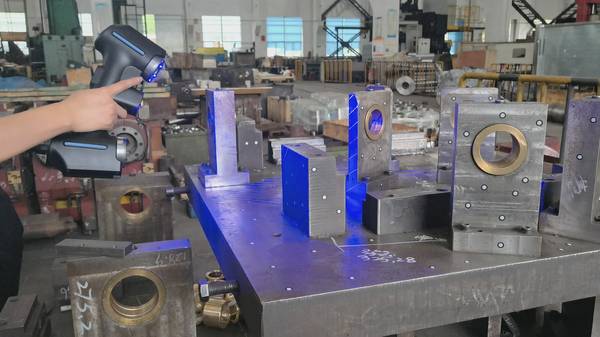
A scanner’s laboratory specification sheet often promises more than it can deliver next to a running CNC mill or in an MRO bay. Vibration, ambient light, and challenging surface finishes degrade data quality. True integration means selecting 3D scanners for CAD built for instability.
The INSVISION AlphaScan’s 1070g handheld form factor provides the rigidity and mobility needed to navigate complex tooling without time-consuming setups.
Its adaptive scanning modes and AI noise filtering maintain data integrity on problematic surfaces—whether a highly reflective coated bumper or a light-absorbing black anodized component. With verified accuracy of 0.02mm and CE/FCC certifications, it delivers a reliable baseline for ISO/ASME-compliant workflows.
The process flows from capture directly to professional software, where engineers generate standardized color deviation maps and export reports for historical SPC tracking.
Always validate scanner performance during initial part qualification under actual lighting and fixture conditions.
Matching Scanner Capability to Part Complexity
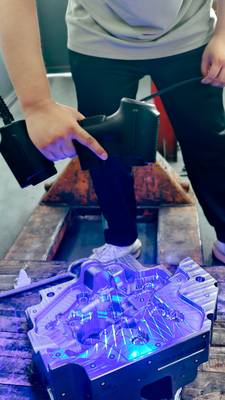
The highest return on investment comes from deploying CAD-driven scanning where the engineering challenge is greatest. Consider reverse-engineering a legacy pump housing with no original drawings, or validating subtle wear on a nuclear valve seat. For these applications, metrology-grade precision is non-negotiable.
The INSVISION AlphaScan excels here, using AI-driven capture to document complex surfaces and deep-hole geometries, enabling precise volumetric comparison for wear analysis.
Before procurement, prepare a test sample representing your most difficult use-case—a high-gloss mold cavity or a part with compound curves—to verify system performance against your tolerances. Successful integration depends less on hardware specs alone and more on data fluidity.
Confirm that output formats (mesh, point cloud, GD&T report) are compatible with your downstream review processes and that report structures align with existing quality management systems to avoid creating data silos.
Validating the Workflow for Your Application
Technical specifications provide a framework, but confidence comes from seeing the system handle your specific parts and workflows. Rather than a generic inquiry, request a targeted demonstration using a representative component from your production line.
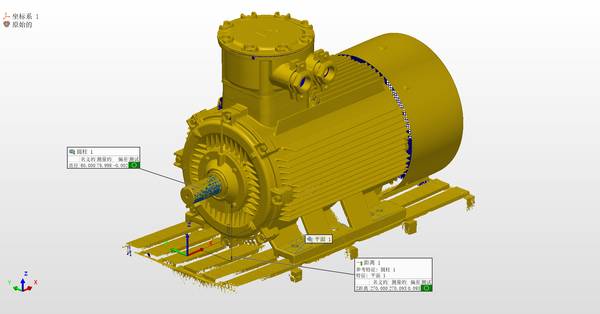
This allows your team to assess the end-to-end process: from physical scan of a challenging surface, through software alignment with your CAD model, to generation of a final inspection report.
Schedule an online engineering consultation to review your requirements and test real-world data output against your internal standards. This grounded approach moves the conversation from theoretical capability to proven application, ensuring the selected 3D scanners for CAD will deliver precise, actionable data on your production floor.
Hangzhou Insvision Technology Co., Ltd.
Address: Building 1, No. 1399 Liangmu Road, Yuhang District, Hangzhou, Zhejiang 311121, China
Copyright © Hangzhou Insvision Technology Co., Ltd. All rights reserved.
Copyright © Hangzhou Insvision Technology Co., Ltd. All rights reserved.